

名称:Grand Theft Auto V Trainer
版本:v1.0-v1.69+
11.PNG
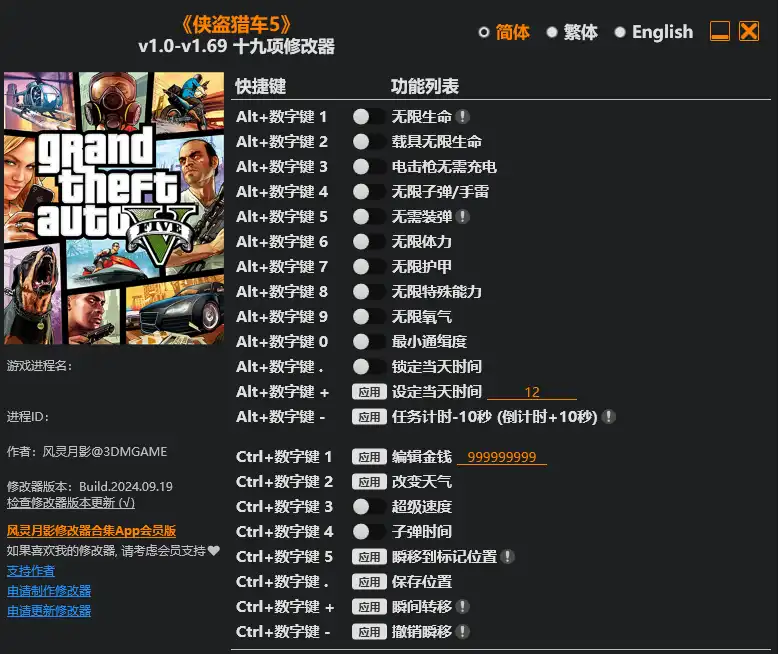
Alt+Num 1 – Infinite Health
Alt+Num 2 – Infinite Vehicle Health
Alt+Num 3 – Stun Gun Instant Recharge
Alt+Num 4 – Infinite Ammo/Grenades
Alt+Num 5 – No Reload
Alt+Num 6 – Infinite Stamina
Alt+Num 7 – Infinite Armor
Alt+Num 8 – Infinite Special Ability
Alt+Num 9 – Infinite Oxygen
Alt+Num 0 – No Wanted Level
Alt+Num . – Freeze Daytime
Alt+Num + – Set Daytime
Alt+Num – – Timer -10 (Countdown Timer +10) Seconds
Ctrl+Num 1 – Edit Money
Ctrl+Num 2 – Change Weather
Ctrl+Num 3 – Super Speed
Ctrl+Num 4 – Slow Motion
Ctrl+Num 5 – Teleport To Waypoint Location
Ctrl+Num . – Save Location
Ctrl+Num + – Teleport
Ctrl+Num – – Undo Teleport
NOTES
The latest game version uses BattlEye anti-cheat protection, in order to launch this game without BattlEye, please follow these instructions:
Method 1 (Steam):
1. Open the properties page of this game on Steam.
2. Add -nobattleye parameter to launch options.
3. Start the game.
Method 2 (Rockstar Games Launcher):
1. Open Rockstar Games Launcher’s settings page.
2. Uncheck the BattlEye option.
3. Start the game.
Note: the Rockstar Games Launcher setting also works for Steam game version.
最新游戏版本使用BattlEye反作弊保护,要使用修改器需禁用BattlEye,请按照以下步骤运行游戏:
方法 1(Steam)
1. 在 Steam 上打开这个游戏的属性页面
2. 在启动选项中增加 -nobattleye 参数
3. 开始游戏
方法 2(Rockstar Games Launcher)
1. 打开 Rockstar Games Launcher 的设置页面
2. 取消 BattlEye 选项
3. 开始游戏
注:Rockstar Games Launcher的设置同样适用于Steam版游戏。
下载权限
查看-
¥免费下载评论并刷新后下载登录后下载
查看演示
- {{attr.name}}:
声明: